
AI & Automation
AI Agents for Small Business: 9 Workflows to Automate First in 2026
Taleef Technologies Team · 2026-08-19
AI capabilities, market research and cited statistics were checked on 18 August 2026. Review platform capabilities, privacy requirements and sector rules before implementation.

AI agents for small business are software systems that can interpret a goal, use connected business tools and complete several steps of a workflow with defined limits. A useful agent might read a website enquiry, extract the customer’s need, create a CRM record, assign the lead and prepare a response. It should not be treated as an unsupervised digital employee.
The best place to start is a frequent, repeatable and reversible workflow where the inputs are already digital and a person can review exceptions. Lead routing, inbox triage, CRM updates and support-answer preparation are usually better first projects than payments, hiring decisions or legal commitments.
The short answer: what should a small business automate first?
Start with work that has four characteristics:
- It happens often.
- The rules are reasonably clear.
- A mistake can be detected and reversed.
- Success can be measured in time, response speed, error rate or revenue movement.
For many businesses, the first valuable workflow is lead response and CRM routing. The agent can acknowledge an enquiry immediately, collect missing details, create or update the contact record and alert the right person. A human still owns qualification decisions, pricing and the sales conversation.
Why AI agents are a serious small-business topic in 2026
The market has moved beyond experimenting with prompts. Google Cloud describes 2026 as an “agent leap”, in which AI coordinates multi-step workflows, and its report draws on more than 3,466 global executives. Adoption, however, is running well ahead of implementation maturity:
The gap between the first two numbers is the story: most small businesses have tried AI somewhere, very few have actually built it into how the business runs. Goldman Sachs’ survey points to technical expertise, tool selection, and data-privacy concerns as the common barriers. The Federal Reserve Bank of San Francisco’s research points to costs, training, and system upgrades as the blockers on its side.
The practical opportunity is therefore not “add AI everywhere.” It is to connect AI to one constrained workflow that already matters.
AI agent vs chatbot vs workflow automation
These terms overlap, but they are not interchangeable.
| System | What it does | Best use | Main limitation |
|---|---|---|---|
| Chatbot | Responds inside a conversation | FAQs, lead capture, first-line support | It may stop after answering unless connected to other systems |
| Fixed automation | Runs predefined steps when a trigger occurs | Notifications, data syncing, recurring reports | It struggles when inputs vary or require interpretation |
| AI agent | Interprets an input, chooses from allowed actions and completes multiple steps | Triage, qualification, research, preparation and cross-system workflows | It needs permissions, controls, evaluation and exception handling |
A chatbot can be one interface to an agent. A fixed automation can be one tool used by an agent. The business value comes from the complete workflow, not from the label.
9 AI-agent workflows worth evaluating first
1. 🌐 Website enquiry response and lead qualification
A prospect visits after hours, asks a specific question and leaves before anyone responds.
- Answer approved questions using the company's current knowledge.
- Capture the visitor's need, location, timeline and contact details.
- Identify signals that suggest sales intent.
- Create a lead or send structured information to the CRM.
- Notify the appropriate team member.
The agent should not promise pricing, delivery dates, contractual terms or product capabilities that have not been approved.
Enquiry-to-lead rate, median response time, qualified conversations and meetings booked.
2. 🗂️ CRM record creation, enrichment and routing
Leads arrive through forms, email, chat and referrals, then wait for someone to copy information into the CRM.
- Extract contact and company details from the enquiry.
- Check whether the record already exists.
- Create or update the CRM entry.
- Apply a source, service interest and priority label.
- Route the lead using territory, product or workload rules.
Keep account ownership overrides, lead rejection and material data changes reviewable.
Records created without re-entry, duplicates prevented, routing accuracy and time to first owner action.
3. 🔁 Sales follow-up preparation
Good prospects go quiet because the next action depends on a salesperson remembering to send it.
- Detect leads without a completed next step.
- Summarise the latest conversation and open questions.
- Draft a contextual follow-up.
- Recommend the next task and due date.
- Escalate stalled, high-value opportunities.
A person approves external messages until the workflow is proven. Discounts, commitments and negotiation remain human decisions.
Overdue follow-ups, response rate, opportunities with a next action and lead-to-opportunity conversion.
4. 🎧 Customer-support triage and answer preparation
Every support message enters the same queue even though some are routine, some urgent and some require specialist judgment.
- Classify the request by topic, urgency and customer.
- Retrieve relevant approved instructions.
- Draft an answer or complete a low-risk action.
- Route exceptions to the correct specialist.
- Summarise the issue and work already completed.
Complaints, refunds, safety issues, regulated advice and emotionally sensitive cases should be escalated.
First-response time, correct routing, resolution time, reopen rate and customer satisfaction.
5. 💬 Shared-inbox routing and conversation summaries
Customer messages are split across website chat, WhatsApp and team inboxes, making ownership and follow-up unclear.
- Recognise the customer across permitted channels.
- Categorise the conversation and identify intent.
- Assign it to the right queue or teammate.
- Produce a concise summary when ownership changes.
- Flag messages that have not received a response.
Maintain channel permissions and customer consent. Do not let the system expose private conversations to users who should not see them.
Unassigned conversations, duplicate replies, transfer time and conversations resolved without channel switching.
6. 🧾 Quote, order and invoice preparation
Staff copy the same customer, product and pricing information between email, CRM, order and finance systems.
- Extract the requested items and commercial context.
- Retrieve the approved price list and customer terms.
- Prepare a draft quote or order record.
- Identify missing or conflicting information.
- Send the completed draft to an authorised person.
Final prices, discounts, bank details, tax treatment and the act of sending or committing the business require approval.
Preparation time, correction rate, approval turnaround and order-to-invoice delay.
7. 📦 E-commerce exception management
Teams spend time finding delayed, failed or unusual orders rather than resolving them.
- Monitor order, inventory, payment and delivery statuses.
- Identify defined exceptions, such as a paid order with no fulfilment update.
- Gather the customer and order context.
- Recommend the next permitted action.
- Create a task or alert the correct owner.
Refunds, cancellations, fraud decisions and changes to payment details need controlled approval.
Time to detect exceptions, unresolved-order age, manual status checks and customer contacts per order.
8. 📊 Management reporting and anomaly summaries
Weekly reporting begins with collecting and reconciling data rather than making decisions.
- Pull approved metrics from connected systems.
- Check freshness and missing data.
- Compare results with targets and previous periods.
- Highlight unusual changes.
- Prepare a narrative summary with links back to source records.
The agent can identify patterns; accountable managers interpret causes and make financial or operational decisions.
Report-preparation time, data discrepancies, time from period close to review and source traceability.
9. 📚 Internal knowledge retrieval and procedure guidance
Employees interrupt specialists for answers that already exist in policies, proposals, manuals and project documents.
- Search an approved knowledge collection.
- Answer with the relevant source and revision date.
- State when the available material is insufficient.
- Route unresolved questions to the document owner.
- Identify repeated questions that reveal a documentation gap.
Limit access according to the user's existing permissions. Do not combine confidential information from areas the requester cannot access.
Repeated internal questions, answer acceptance, escalation rate and outdated documents identified.
Use this decision matrix before choosing a workflow
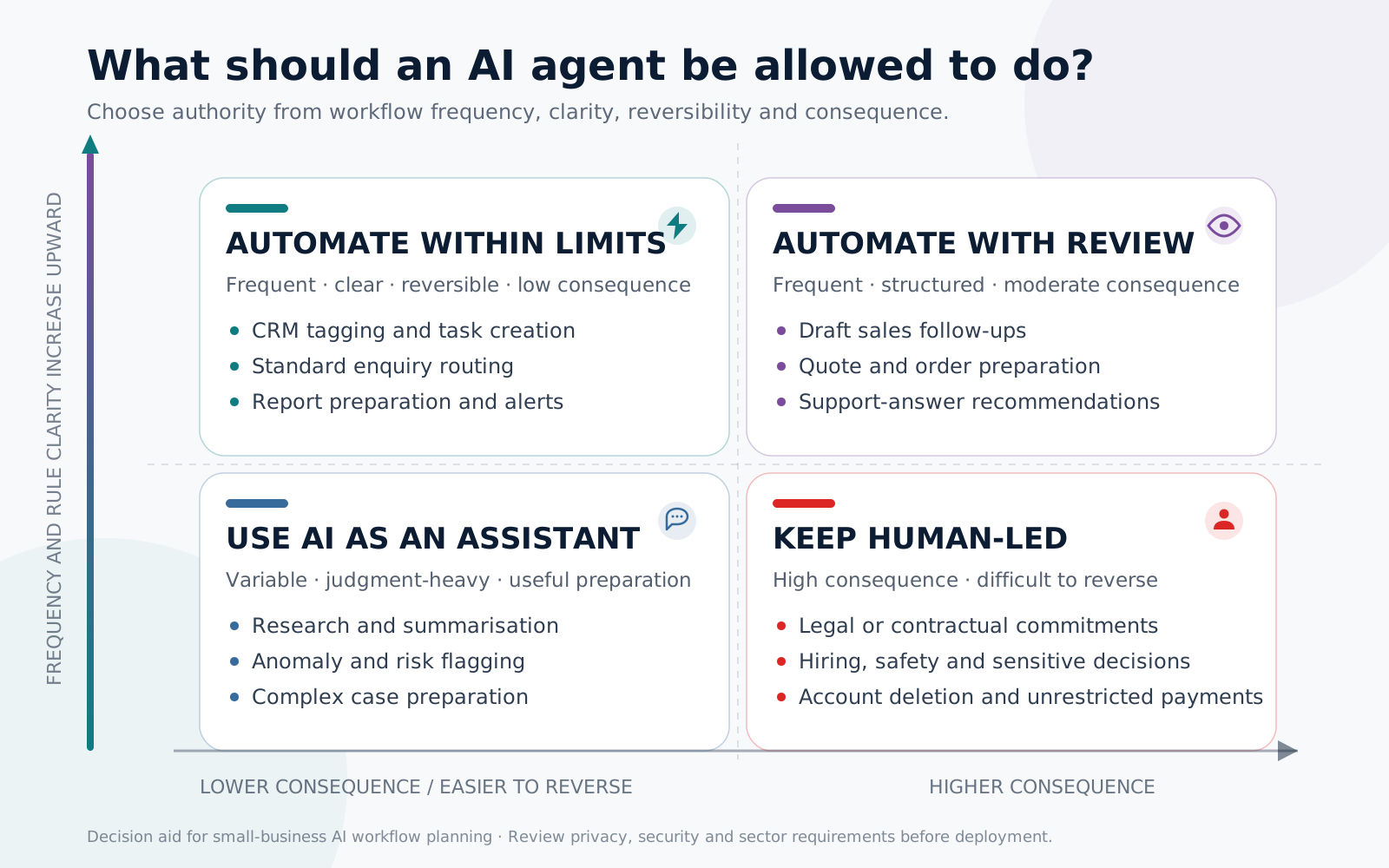
Score a candidate workflow on five questions:
- Frequency: Does it happen often enough to justify integration and maintenance?
- Clarity: Can a knowledgeable employee explain the normal steps and exceptions?
- Data readiness: Are the required inputs available, current and permissioned?
- Reversibility: Can an incorrect action be detected and undone?
- Consequence: Could an error create financial, legal, safety, privacy or relationship damage?
High-frequency, clear and reversible work is the first automation tier. High-consequence work should remain behind explicit approval even when an agent prepares most of it.
A practical approval model
| Level | Agent authority | Suitable examples |
|---|---|---|
| 0: Observe | Read and summarise only | Workflow discovery, reporting, conversation summaries |
| 1: Recommend | Prepare an action for review | Draft replies, proposed routing, quote preparation |
| 2: Act within limits | Complete defined, reversible actions | Add CRM tags, create tasks, route standard enquiries |
| 3: Human approval required | Wait before consequential action | Send a quote, issue a refund, change an order |
| 4: Human-only | No agent authority | Legal commitments, hiring decisions, safety judgments, account deletion |
Start at a lower authority level than you think you need. Expand only after reviewing real outcomes and exceptions.
How to measure whether an AI agent is working
Do not measure success by the number of messages processed. Compare the workflow before and after implementation.
Use a simple baseline:
- Monthly workflow volume
- Average human minutes per case
- Error or rework rate
- Average waiting time
- Conversion or resolution outcome
- Cost of software, integration, monitoring and review
A practical monthly value calculation is:
Time value recovered + errors avoided + incremental gross profit − total operating cost
Use gross profit, not revenue, when valuing additional sales. Include the human review time; an “automated” workflow that creates more checking work has not succeeded.
A safer 30-day starting plan
The NIST AI Risk Management Framework recommends governance, testing, measurement and ongoing management rather than treating deployment as the finish line. Its guidance is voluntary, but the operating principles are useful for organisations of any size.
Common mistakes to avoid
- Automating a broken process: Faster confusion is still confusion.
- Starting with one giant agent: Several constrained workflows are easier to test, secure and improve.
- Giving broad permissions too early: Use the minimum access and authority needed for the job.
- Using outdated knowledge: Assign owners and review dates to source content.
- Hiding uncertainty: The agent should be able to say that it lacks enough information.
- Skipping exception design: Real work contains duplicates, missing fields, unusual customers and system outages.
- Measuring activity instead of outcomes: More automated actions do not automatically mean better operations.
- Removing humans from relationship moments: Escalations, negotiation, empathy and accountability remain human strengths.
Where to begin with Taleef
The right starting point depends on where the work is currently breaking:
- If website visitors leave unanswered, evaluate TaleefAIBot.
- If leads and follow-ups are scattered, evaluate Taleef CRM.
- If conversations are split across channels, evaluate TaleefChat.
- If employees re-enter the same data, start with Technology Integration Solutions.
- If the problem spans several tools and teams, begin with the Business Automation & Integration solution.
The first conversation should identify one workflow, its baseline and its approval boundary, not force an AI product into a process that does not need it.
Discuss an AI and automation workflow with Taleef →
Related reading
- Agentic AI for Dubai businesses: a 2026 adoption roadmap. What Dubai’s 295,000-company programme means for a UAE SME, and how to keep control while you adopt.
- WhatsApp CRM integration in Dubai: the complete 2026 guide
- ChatGPT Ads guide 2026: how they work and how to run them